
Spreadsheet compliance without migration
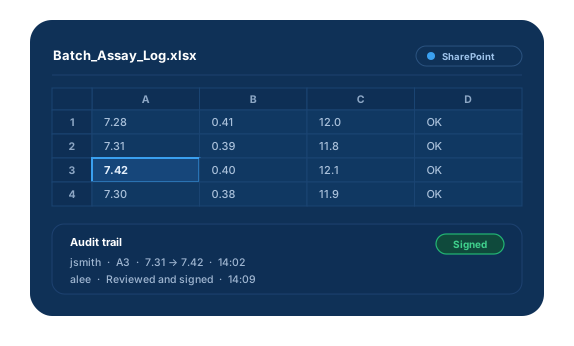
Spreadsheets drive critical GxP work, and one uncontrolled error can mean improper batch release or erroneous trial results. Any spreadsheet that supports a predicate rule must meet Part 11. eInfoTree Excel Desktop adds audit trails, e-signatures and security to the files you already use.
Benefits
- Users still open spreadsheets with a double-click.
- No migration: files stay where they are.
- Audit trails and settings are stored in a SQL database for backup and reporting.
- Quick install with no dedicated server.
- A validation package is available to cut validation effort.
Features
Audit Trail
A secure record of every change.
- Who and when: User ID, full name, date and time.
- What changed: Cell location, action, old and new values.
- Why: A configurable reason field.
- Access: Logins, logouts and invalid attempts.
Electronic Signatures
Signatures that meet Part 11 rules.
- Record: User ID, printed name, date, time and meaning.
- Meanings: Configurable.
- Re-signing: Signing outside a continuous access period requires all components.
Security
Access controls you configure.
- Users: Configurable users and passwords.
- Passwords: Enforced length, composition and aging.
- Lockout: After a configurable number of failed attempts.
- Loss management: Temporarily deauthorize a password and require a new one.
Overcoming 4 Challenges to the Use of GxP Compliant Spreadsheets
Spreadsheets are widely used across biopharmaceutical, pharmaceutical and other FDA-regulated industries, and they count as systems. When they affect product identity, strength, purity or safety, they must be validated and controlled.
Our white paper addresses four common challenges in meeting GxP quality requirements when using spreadsheets.
Quick Question? Get in Touch.